

In the Mood for Dashboard 0.9.5 (freeware)
2013年12月にSkype デスクトップ APIが廃止されるため、Skypeのムードメッセージを設定できなくなります。
その他の機能はこれまで通り使用できます。
iTunesで再生中の曲名を、自動的にSkype、Messages.app/iChat、Adiumのムードメッセージに設定するDashboard Widgetです。
よく使うムードメッセージを登録して切り替えることもできるので、ムードメッセージスイッチャーとしても使用できます。
Growlに曲名を通知したり、Twitter、Blip.fm、FriendFeedへ送信することもできます。
This dashboard widget automatically displays the name of iTunes song as mood message of Skype, Messages.app/iChat and Adium.
And it is able to notify track information to Growl and to send mood message to Twitter, Blip.fm and FriendFeed.
[download 0.9.5] (329KB)
system requirements
- Mac OS X 10.5 or later
- iTunes 4.7.1 or later
Skype 1.5 or later
installation
ダウンロードしたアーカイブを解凍し、「In the Mood.wdgt」をダブルクリックしてください。
Uncompress the downloaded archive, and double-click "In the Mood.wdgt".
バージョン0.8.0でBlip.fmを使用していた場合、Blip.fmのアプリケーションキーをhttp://blip.fm/settings/passwordから取得し、入力してください。
If you have used Blip.fm with version 0.8.0, it is required you to get Application Key from http://blip.fm/settings/password and input it.
バージョン0.9.0からMac OS X 10.5以降対応となりました。
Version 0.9.0 and later require Mac OS X 10.5 or later.
instruction
-
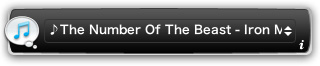
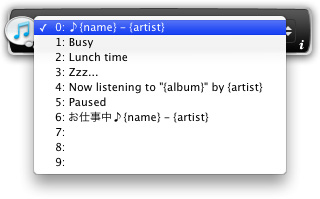
前面のプルダウンメニューから、ムードメッセージを切り替えることができます。
Use pulldown menu on the front side to select mood message.
-
背面では各種設定を行うことができます。
You can configure some settings on the back side.
-
"一般設定" タブ:
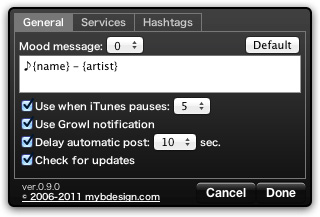
「ムードメッセージ」を編集してムードメッセージおよび表示される曲情報をカスタマイズできます。以下の文字列を使用すると、iTunesで再生中の曲の該当する情報に置き換わります。
Edit "Mood message" to customize mood message and displayed iTunes song information. These keywords are available in mood message:{album} アルバム {album artist} アルバムアーティスト (iTunes 7.0 or later) {artist} アーティスト {bpm} BPM {category} カテゴリ (iTunes 5.0 or later) {comment} コメント {composer} 作曲者 {disc count} ディスク枚数 {disc number} ディスク番号 {genre} ジャンル {grouping} グループ {name} 曲名 {rating} マイレート {track count} トラック数 {track number} トラック番号 {stream name} ストリーミングの局名 {stream url}
{url}ストリーミングのURL {year} 年 「iTunesが一時停止中は以下を使用する」のチェックボックスをオンにすると、iTunesが曲を再生していないときに表示されるムードメッセージを設定できます。
Turn on "Use when iTunes pauses" checkbox to select mood message that is displayed when iTunes pauses.「Growlの通知を利用する」のチェックボックスをオンにすると、iTunesで再生されている曲が変わったときにGrowlに曲情報を通知します。
Turn on "Use Growl notification" checkbox to notify track information to Growl when the playing track has changed.「自動投稿の遅延」のチェックボックスをオンにすると、自動投稿時に曲が変わってしばらくしてから投稿します。
Turn on "Delay automatic post" checkbox to delay posting after the playing track has changed.「自動的にアップデートを確認」のチェックボックスをオンにすると、自動的に新しいバージョンがないか確認します。
Turn on "Check for updates" checkbox to check for a new version of In the Mood automatically. -
"サービス" タブ:
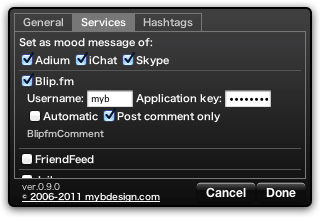
「ムードメッセージを設定」で、ムードメッセージを設定するアプリケーションを選択できます。
In "Set as mood message of" section, turn on checkbox of application to display mood message.各サービス名のチェックボックスをオンにすると、各サービスにムードメッセージを送信することができます。
「ユーザー名」などにアカウント情報を入力します。
(アカウント情報はKeychainに保存されます)
「自動投稿」のチェックボックスをオンにすると自動で、オフにすると手動で前面の「post」ボタンを押したときに送信されます。
Turn on checkboxes beside each service names to send mood message.
Input your account information into "User name" etc.
(Your account informations will be saved in your keychain)
Turn on "Automatic" checkbox to send automatically, or turn off it to send manually by "post" button on the front side.
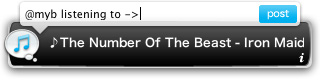
手動で送信する場合は、ムードメッセージの前に任意のテキストを追加することができます。
When you send mood message manually, you can add text before it.
-
"ハッシュタグ" タブ:
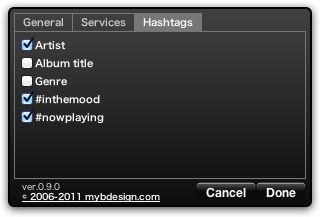
チェックボックスをオンにしたハッシュタグが、投稿時にムードメッセージに追加されます。
Turn on checkboxes and the hashtags will be added to the mood message when posting.
known issues and requests
iTunesのアートワークをSkypeのコンタクトアイコンに表示する。
(Mac版のSkype APIでは非対応のため保留中)Twitterに送信する際の追加テキストに日本語を入力できないことがある。
(現象確認中)
不具合が発生した場合はOS/アプリケーションのバージョンとともにfeedbackからお知らせください。